# 訂閱制

* [如何在後台建立訂閱制方案](#zai-hou-tai-jian-li-fang-an)
* [如何取消訂閱制方案](#cancel)
* [會員端畫面顯示訂閱制方案](#background-entry-and-exit-management)
* [訂閱制相關功能與其他情境](#background-entry-and-exit-management-1)

***

\
（一）在後台建立方案 <a href="#zai-hou-tai-jian-li-fang-an" id="zai-hou-tai-jian-li-fang-an"></a>
---------------------------------------------------------------------------------------

讓會員購買訂閱制方案之前，請先設定你的訂閱制方案

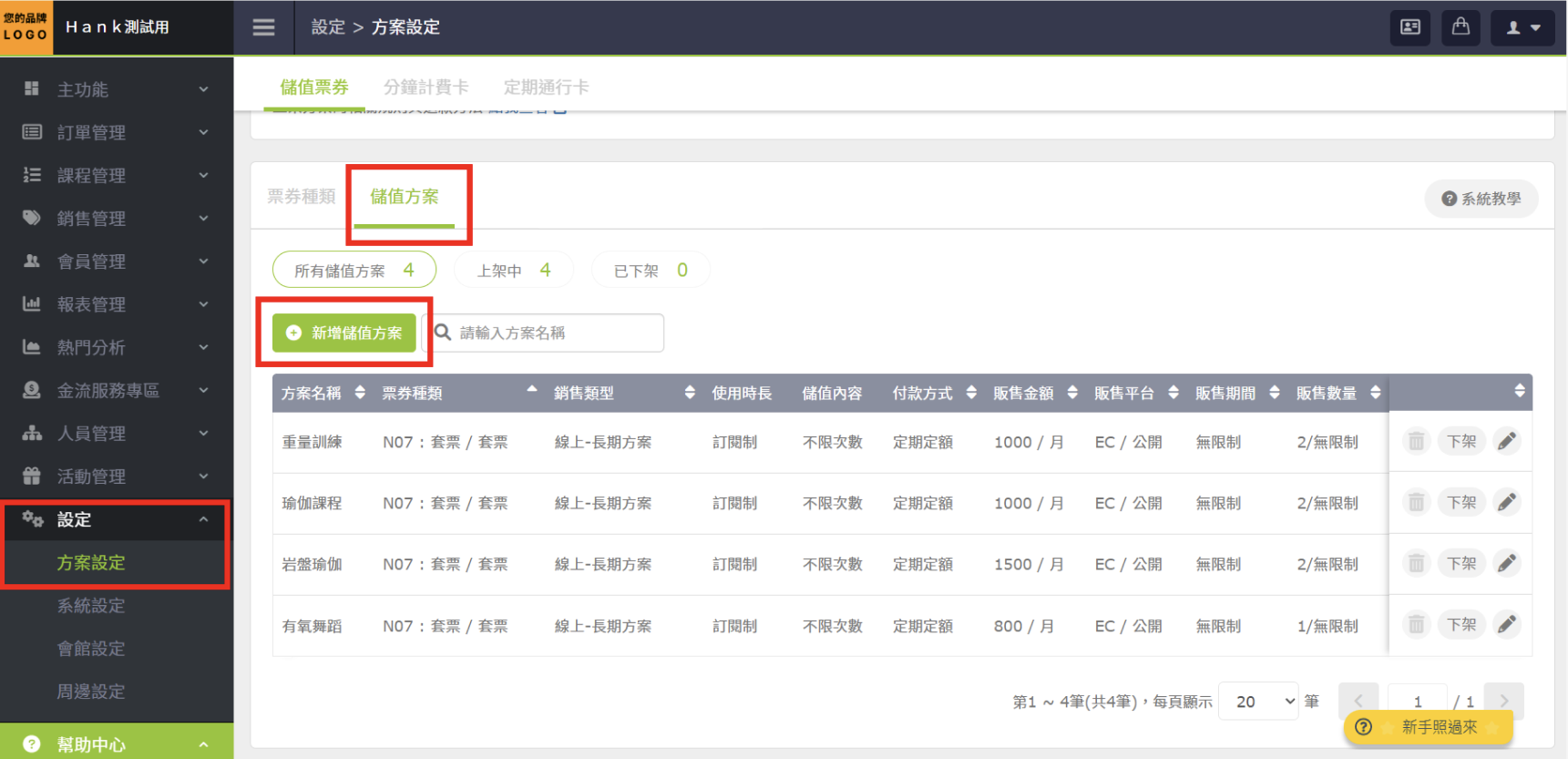
#### 1.  設定＞方案設定＞儲值方案＞新增儲值方案

<figure><img src="https://bookfastpos.com/wp-content/uploads/2023/10/截圖-2023-06-09-下午3.38.31.png" alt=""><figcaption></figcaption></figure>

&#x20;

&#x20;**2. 銷售類型選擇長期方案＞下滑建立方案**

* 注意：訂閱制支援每月扣款，不支援週扣款
* 套票、通行卡都支援訂閱制，所以你可以販售團體課、私人課、會籍的訂閱制了

&#x20;![](https://bookfastpos.com/wp-content/uploads/2023/10/截圖-2023-06-09-下午4.26.39.png)

* 自行設定：你可以設定是否開放顧客線上取消訂閱，若開放，顧客可在會員端 APP / LINE Mini APP / 品牌官網自行取消。若不開放，顧客需聯繫您，讓您在後台取消。

<div align="left"><figure><img src="/files/5l4cXpLVUHS3UlGgQzVF" alt="" width="290"><figcaption></figcaption></figure></div>

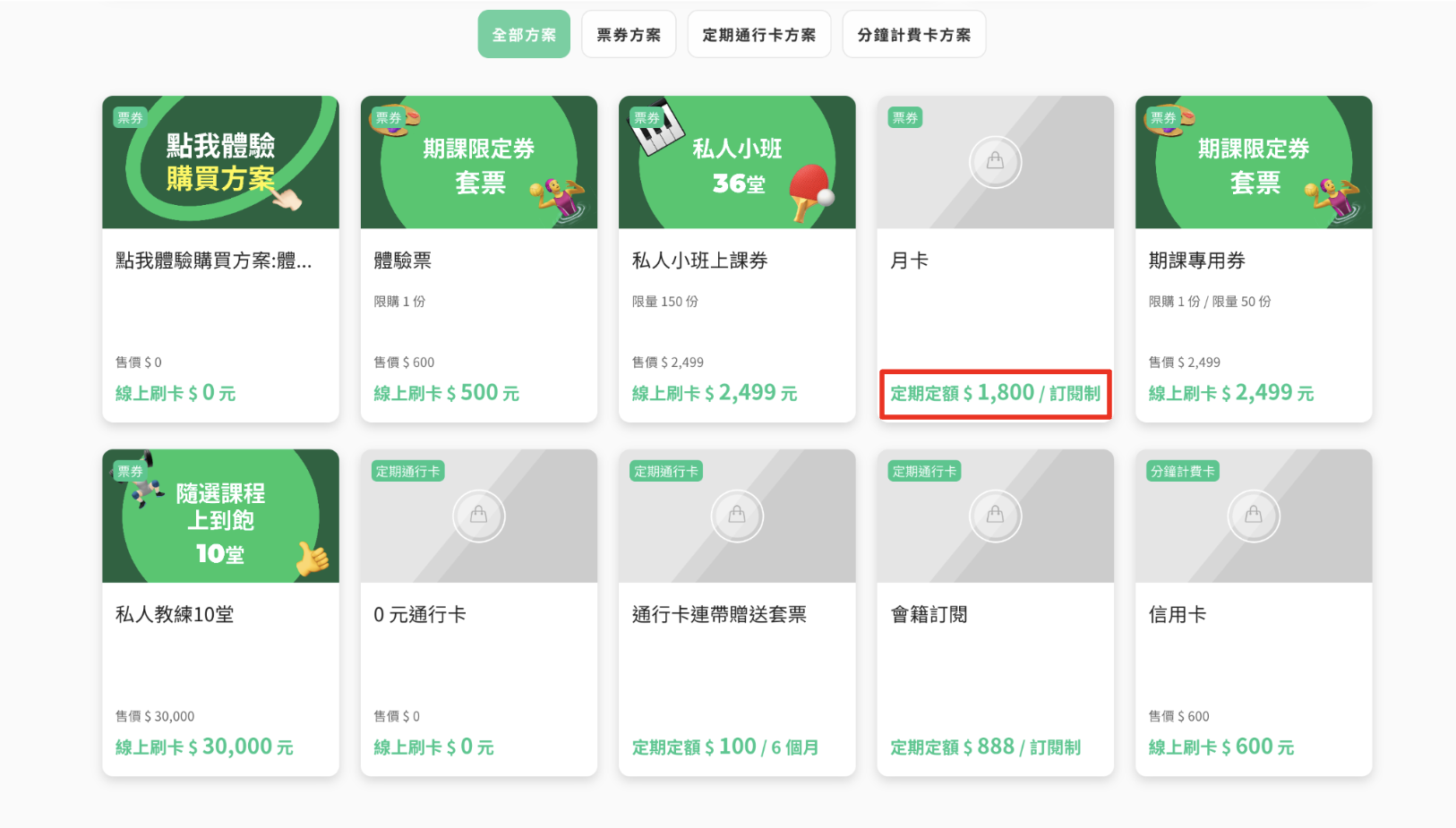
#### &#x20;        3. 設定完成後，品牌官網即會顯示商品

<figure><img src="https://bookfastpos.com/wp-content/uploads/2023/10/截圖-2023-06-09-下午4.55.22.png" alt=""><figcaption></figcaption></figure>

&#x20;

&#x20;

***

## （二）如何取消訂閱制方案 <a href="#cancel" id="cancel"></a>

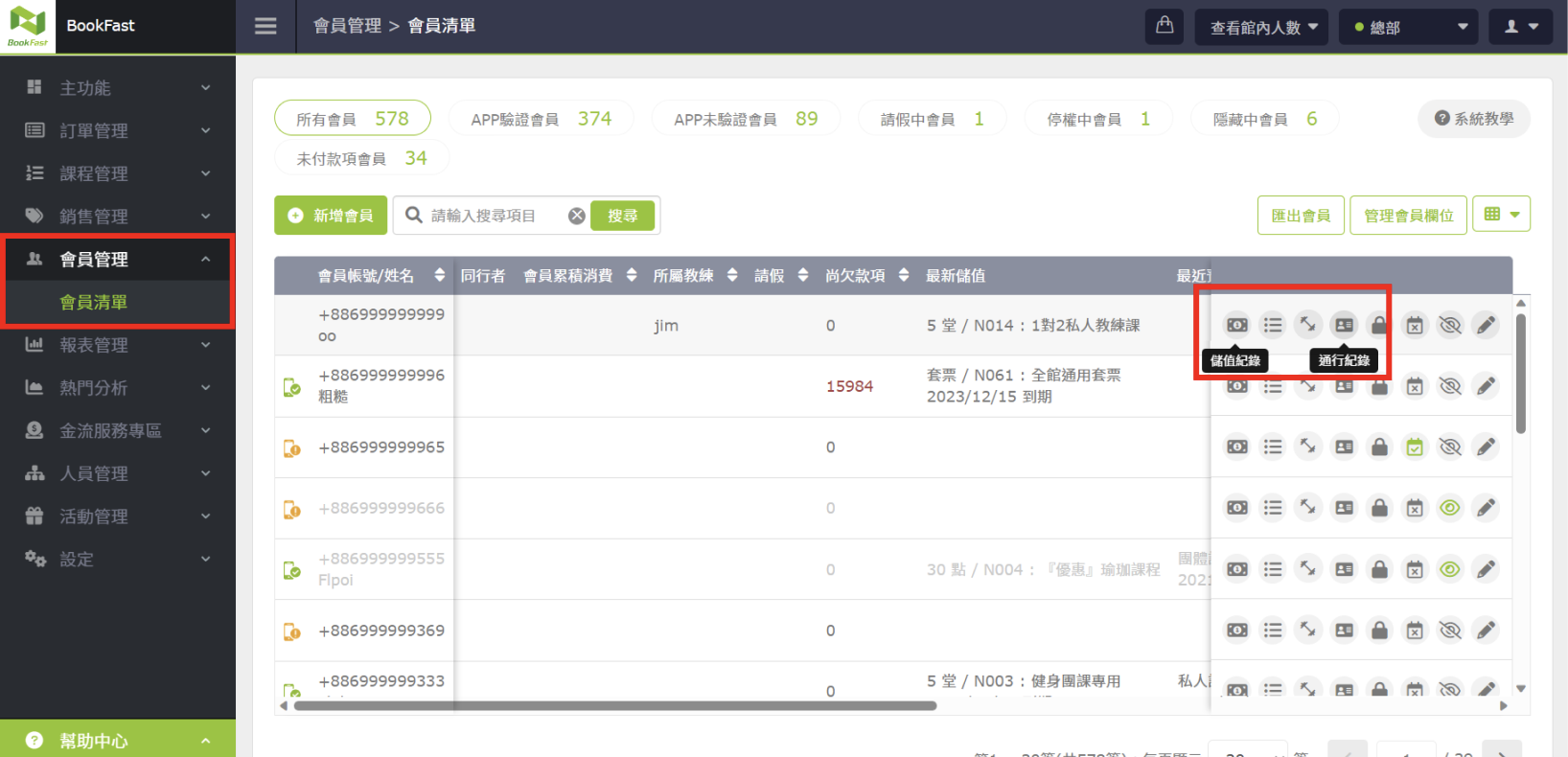
#### **1. 點選 會員管理＞會員清單＞點選儲值紀錄 or 通行紀錄**

<figure><img src="https://bookfastpos.com/wp-content/uploads/2023/10/截圖-2023-06-09-下午4.33.40.png" alt=""><figcaption></figcaption></figure>

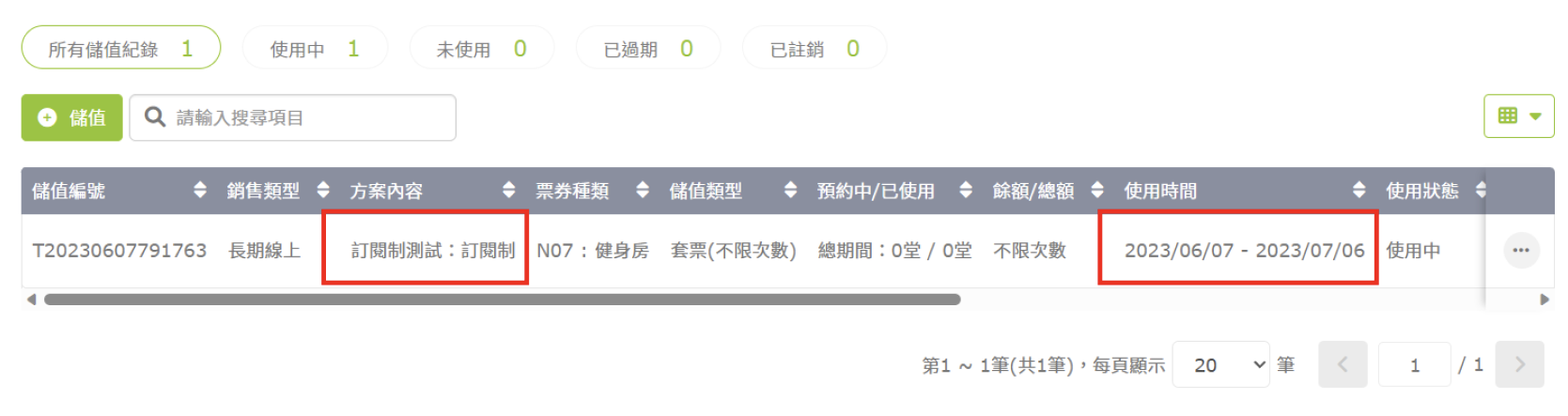
#### **2. 點進去後會顯示會員的方案內容、使用時間**

<figure><img src="https://bookfastpos.com/wp-content/uploads/2023/10/截圖-2023-06-09-下午3.59.22.png" alt=""><figcaption></figcaption></figure>

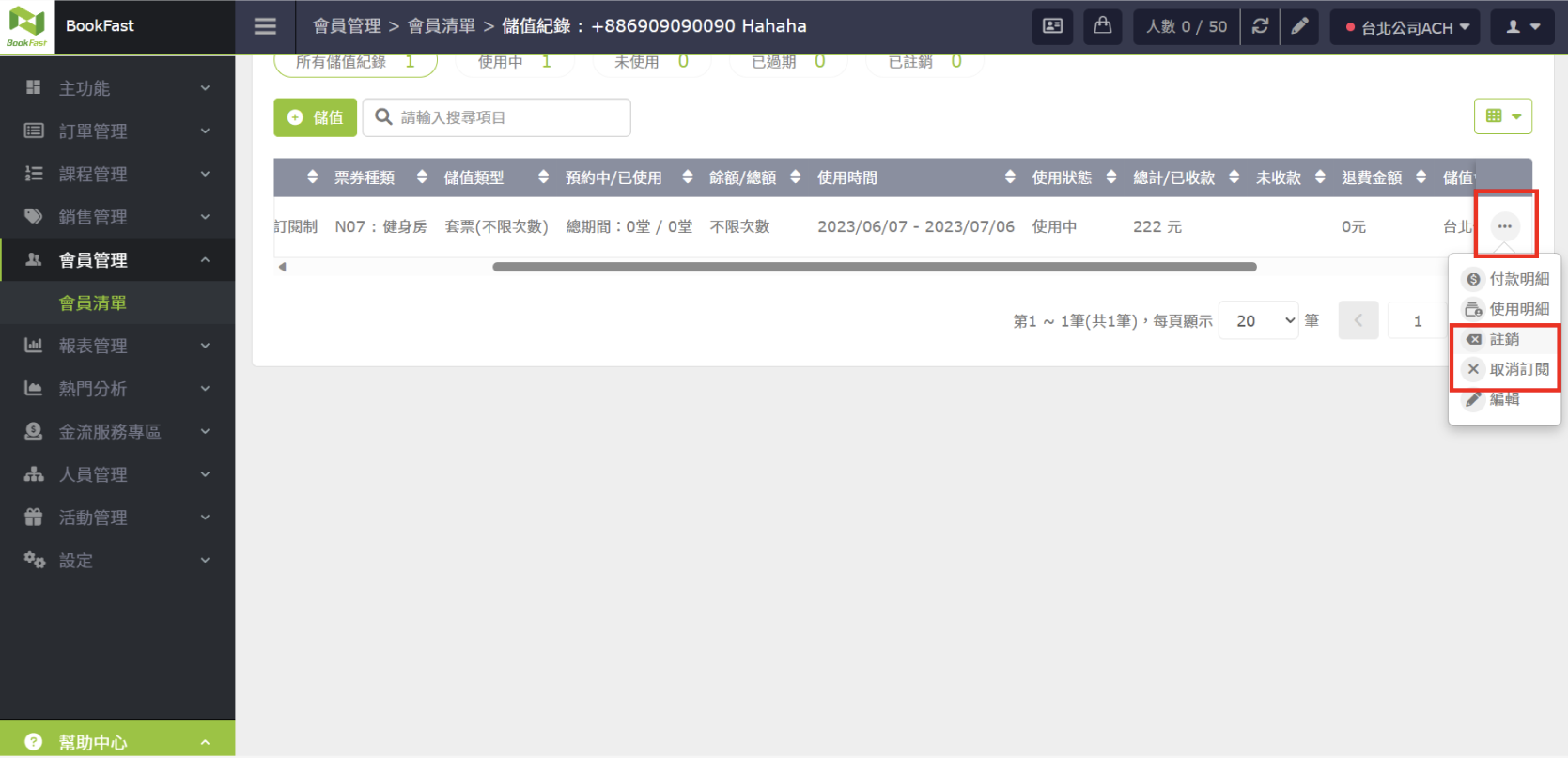
#### **3. 點選最右邊的「...」按鈕，選擇取消訂閱或註銷**

<figure><img src="https://bookfastpos.com/wp-content/uploads/2023/10/截圖-2023-06-09-下午4.35.58.png" alt=""><figcaption></figcaption></figure>

&#x20;

＊差別：

* 註銷：立即讓方案終止使用，可退款
* 取消訂閱：本期可使用完畢，不開放退費，下期不會自動扣款，且終止使用。取消訂閱填寫的原因會顯示在訂單記錄內
* 訂閱制方案也支援 請假延後扣款，規則跟長期方案的月費一樣。

&#x20;

***

\
（三）會員端畫面 <a href="#background-entry-and-exit-management" id="background-entry-and-exit-management"></a>
-------------------------------------------------------------------------------------------------------

### 品牌形象官網

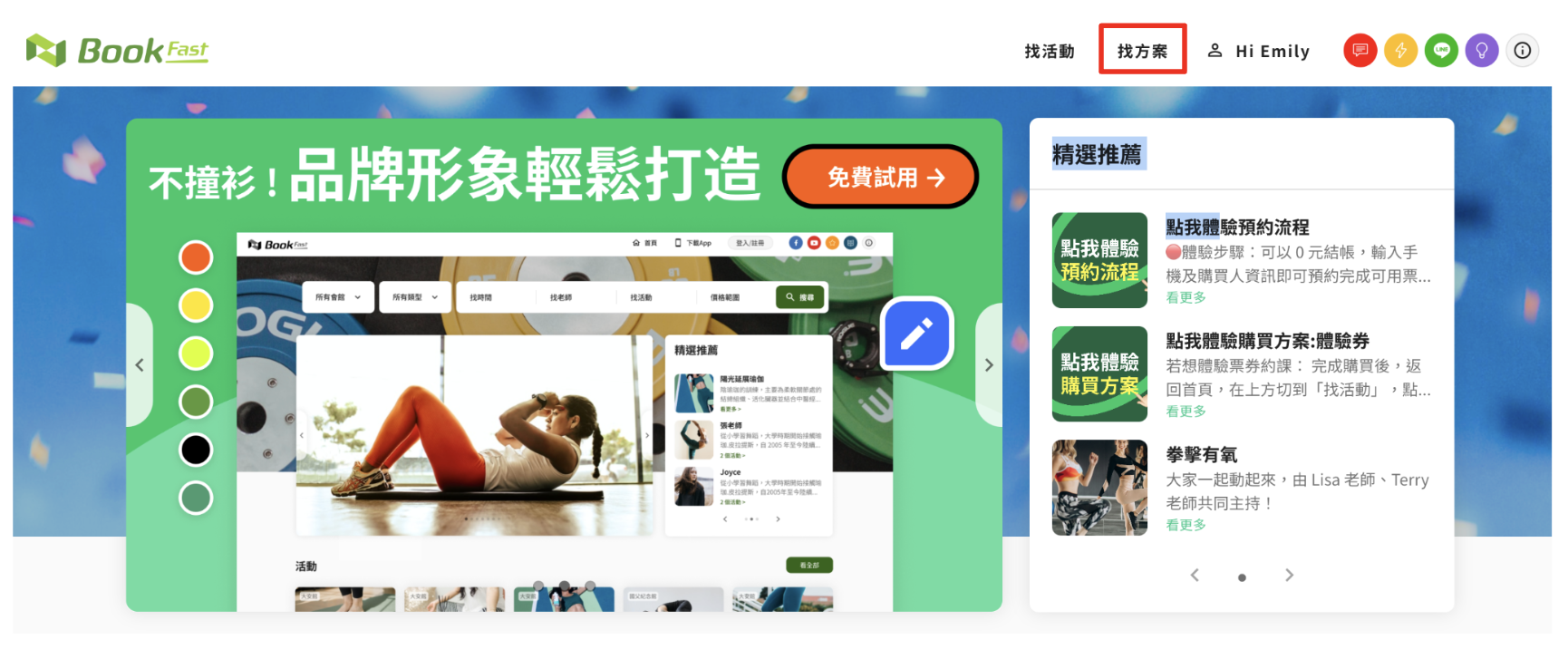
#### **1. 會員可以在找方案頁面內下單訂閱制方案**

&#x20;

<figure><img src="https://bookfastpos.com/wp-content/uploads/2023/10/截圖-2023-06-09-下午4.51.14.png" alt=""><figcaption></figcaption></figure>

<figure><img src="https://bookfastpos.com/wp-content/uploads/2023/10/截圖-2023-06-09-下午4.55.22.png" alt=""><figcaption></figcaption></figure>

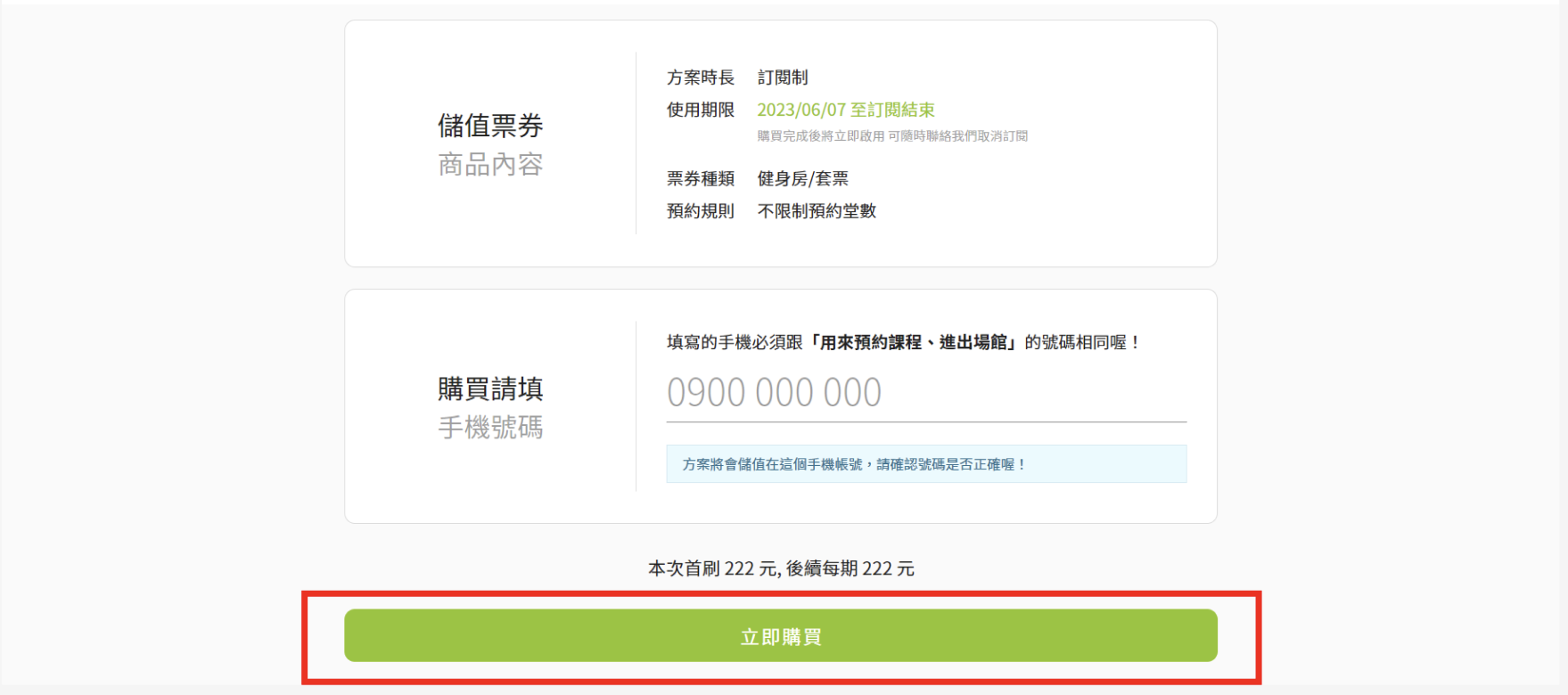
#### **2. 填寫完相關資訊後即可立即購買**

* **購買方式跟其他線上金流方案相同**

<figure><img src="https://bookfastpos.com/wp-content/uploads/2023/10/截圖-2023-06-09-下午4.58.46.png" alt=""><figcaption></figcaption></figure>

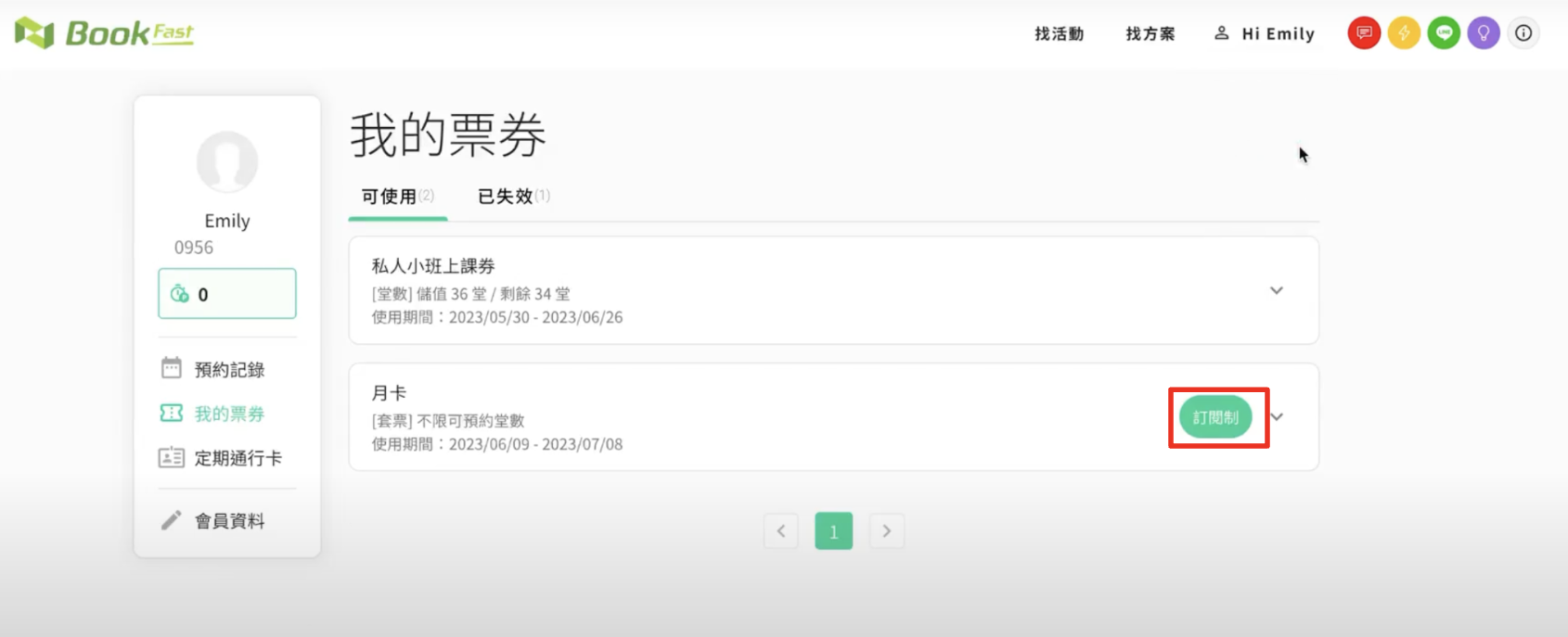
#### **3. 購買後可查看訂閱制紀錄**

<figure><img src="https://bookfastpos.com/wp-content/uploads/2023/10/截圖-2023-06-09-下午5.16.39.png" alt=""><figcaption></figcaption></figure>

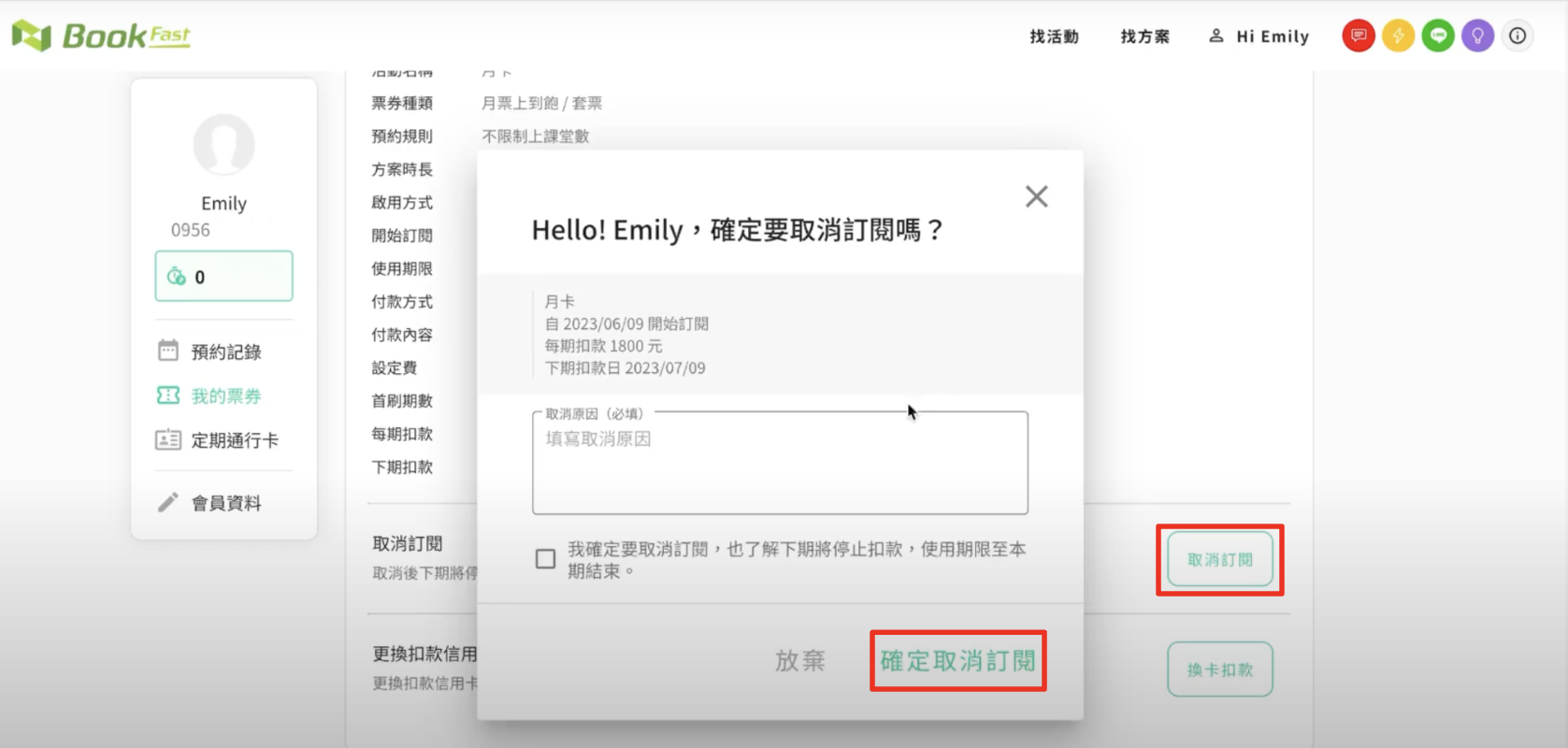
#### **4. 會員可自行取消訂閱並填寫取消原因**

* 取消原因會顯示在後台會員的訂單備註內

<figure><img src="https://bookfastpos.com/wp-content/uploads/2023/10/截圖-2023-06-09-下午5.29.24.png" alt=""><figcaption></figcaption></figure>

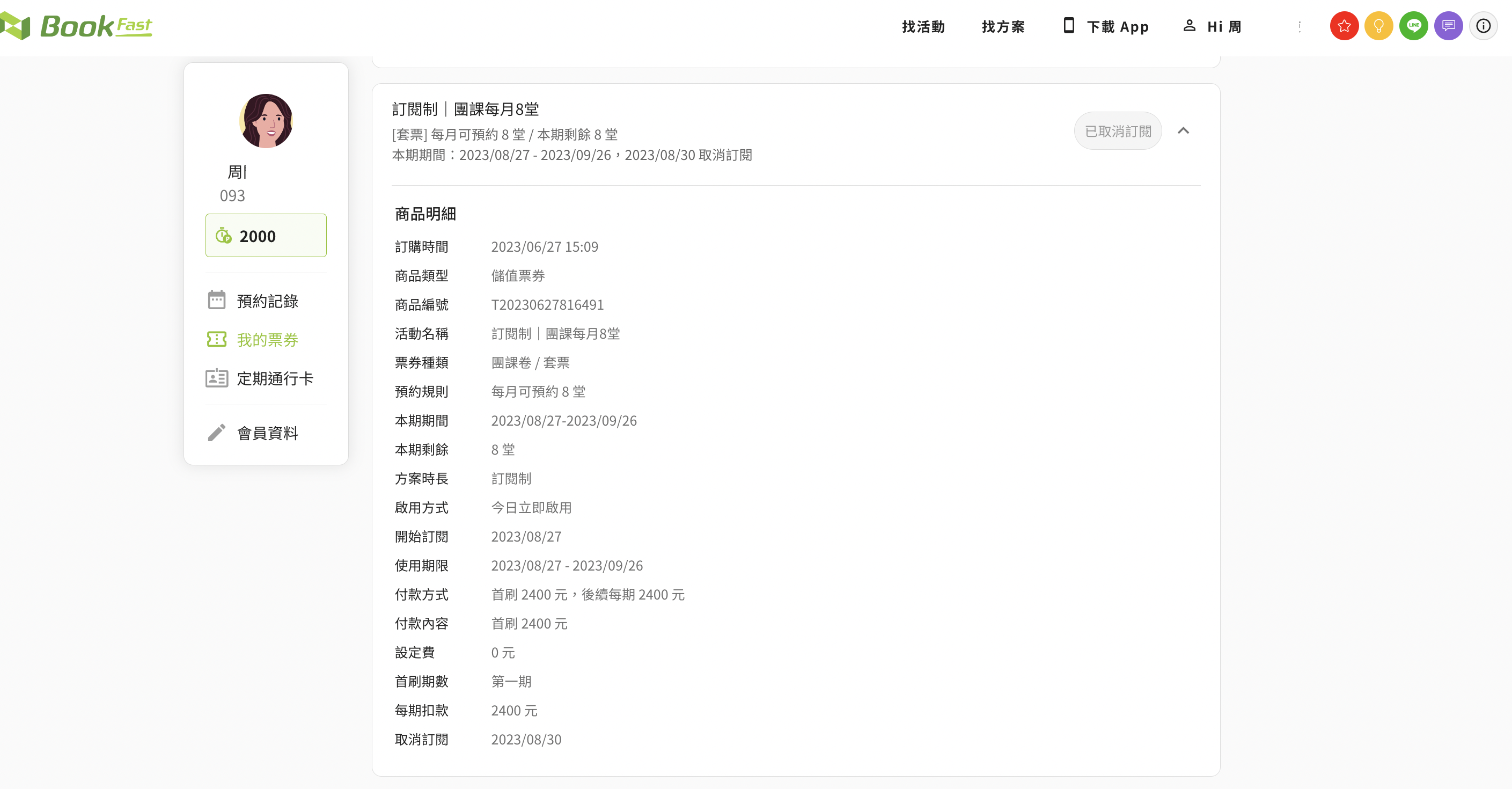
取消後，會員可以看到商品會顯示「已取消訂閱」，使用期限的結束日會更新成本期結束的日子

<figure><img src="https://bookfastpos.com/wp-content/uploads/2023/10/截圖-2023-08-30-上午10.51.57.png" alt=""><figcaption></figcaption></figure>

<figure><img src="https://bookfastpos.com/wp-content/uploads/2023/10/截圖-2023-08-30-上午10.52.29.png" alt=""><figcaption></figcaption></figure>

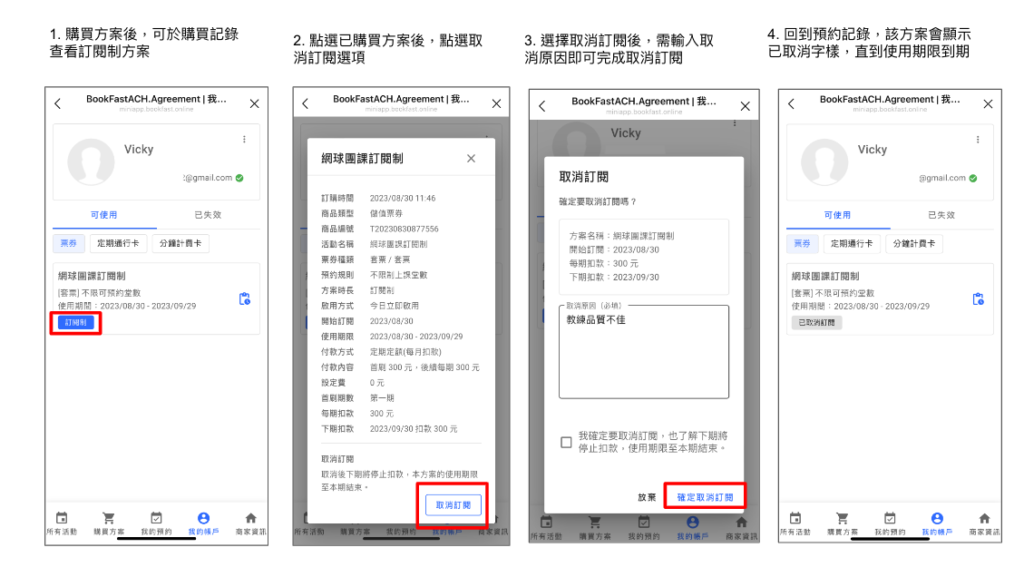
### LINE 官方預約

* 注意：目前 LINE 預約渠道無法於會員端自行進行換扣款卡操作，須於後台查看該會員『儲值紀錄』，點選該方案的『付款明細』後，即會顯示換卡扣款連結可提供給會員

<figure><img src="https://bookfastpos.com/wp-content/uploads/2023/10/截圖-2023-08-30-下午1.12.44-1024x567-1.png" alt=""><figcaption></figcaption></figure>

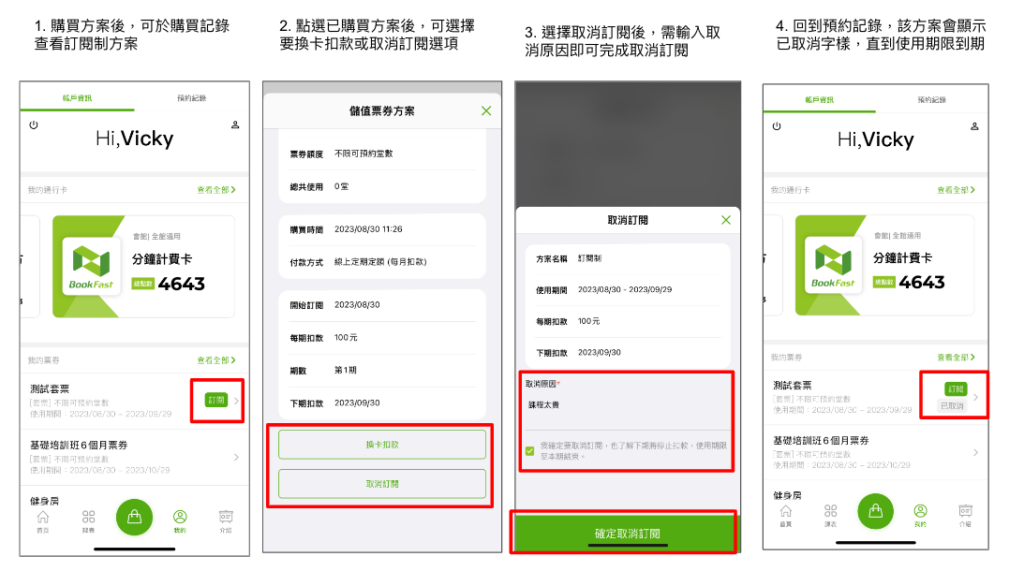
### 會員 App

<figure><img src="https://bookfastpos.com/wp-content/uploads/2023/10/截圖-2023-08-30-下午1.19.12-1024x571-1.png" alt=""><figcaption></figcaption></figure>

***

## （四）訂閱制相關功能與其他情境 <a href="#background-entry-and-exit-management" id="background-entry-and-exit-management"></a>

### **➤** 訂閱制扣款失敗後，顧客要如何更新付款卡片後能自行進場？

#### 會員 App&#x20;

1. 當訂閱制扣款失敗導致通行卡無法進場時，顧客能自行從會員 App 中的 『進出場』、『我的預約』 入口進入自行換卡，<mark style="color:orange;">扣款成功後即可使用該張通行卡進自行進場</mark>
2. 首頁 『進出場』  ->  『查看詳情』  ->  『前往換卡扣款』 ->  換卡成功後會直接進行扣款 ->  使用該張卡片進場

   <figure><img src="/files/bZ3WA0beDp0ZesjqAPip" alt=""><figcaption></figcaption></figure>
3. 首頁 『我的預約』  ->  『查看全部』 ->  『購買記錄』 中點擊該方案 -> 『前往換卡扣款』 ->  換卡成功後會直接進行扣款 -> 使用該張卡片進場
   * 注意：在通行卡方案明細頁選取 『編輯付款方式』，更新付款資訊後會於下期扣款進行更新

<div align="left"><figure><img src="/files/B7au2GzFRA2rRfyKhfN8" alt=""><figcaption></figcaption></figure></div>

#### LINE Mini App 及品牌形象官網

* 注意：目前 LINE Mini App 及品牌形象官網預約渠道無法即時進行換卡扣款，須於後台查看該會員 『儲值紀錄』，點選該方案的 『付款明細』 後，將更換連結提供給顧客，更換扣款成功後，即能使用該張卡片進場

#### &#x20;


---

# Agent Instructions: Querying This Documentation

If you need additional information that is not directly available in this page, you can query the documentation dynamically by asking a question.

Perform an HTTP GET request on the current page URL with the `ask` query parameter:

```
GET https://bookfast.gitbook.io/bookfast-xi-tong-jiao-xue/ying-yun-gong-neng/piao-quan-yu-fang-an/ding-qi-dinge-ding-yue-zhi-hui-ji/ding-yue-zhi.md?ask=<question>
```

The question should be specific, self-contained, and written in natural language.
The response will contain a direct answer to the question and relevant excerpts and sources from the documentation.

Use this mechanism when the answer is not explicitly present in the current page, you need clarification or additional context, or you want to retrieve related documentation sections.